


3 Car Wi‑Fi Choices in Croatia and When to Buy or Book
The best Wi-Fi u vozilu setup depends on how you travel. A smartphone hotspot suits solo commuters with light needs, a portable MiFi router fits families or road trips needing stronger, shared coverage, and integrated factory Wi-Fi wins for luxury travel or managed transfers where seamless connection matters most. Whichever you choose, check your data plan and roaming terms before you leave, since Croatian operators handle tethering differently across providers.
TL;DR:
- Smartphone hotspots are free but less stable and drain your phone’s battery quickly during long drives or in rural areas with weak signals.
- Portable routers offer better coverage, handle more devices, and can be used across multiple vehicles, but require a separate data plan and hardware purchase.
- Built-in factory Wi-Fi provides the strongest signal due to external antennas and seamless connection but involves higher costs and reliance on automaker data packages.
- Croatian tethering plans often cap hotspot data separately and may throttle speeds after certain usage thresholds, so plan accordingly for long trips.
- Booking private transfers with onboard Wi-Fi simplifies connectivity, eliminates hardware concerns, and is ideal for travelers prioritizing comfort and convenience.
Table of Contents
- Wi-Fi in the Car: Phone Hotspot vs. Portable Router vs. Built-In System
- How Each Wi-Fi Option Actually Works on Croatian Roads
- Choosing a Croatian Data Plan Without Roaming Surprises
- Installing Car Wi-Fi Safely: What to Watch For
- Checklist: What to Test Before You Buy or Activate Car Wi-Fi
- Onboard Wi-Fi on Croatia’s Private Transfers and Tours
- Why the Hardware-First Advice Misses the Point
- Prefer Connectivity Handled for You? Book a Private Transfer Instead
- Sources
- FAQ
Wi-Fi in the Car: Phone Hotspot vs. Portable Router vs. Built-In System
Every driver in Croatia faces the same three choices when it comes to wireless internet for vehicles. Understanding what separates them saves you from buying the wrong gear or overpaying for a feature you won’t use.
A smartphone hotspot costs nothing extra if you already have a data plan with tethering included. It works fine for one or two people checking email or following turn-by-turn directions. The catch: it drains your phone battery fast, ties up your main device, and tends to lose stability on longer coastal drives where signal handoffs between towers get spotty.
A portable MiFi or 4G/5G router is the middle ground most Croatian families and road-trippers end up choosing. These devices run on their own SIM or eSIM, don’t touch your phone’s battery, and generally handle more connected devices with steadier throughput. Brands like TP-Link and Huawei show up constantly in Croatian how-to guides because their vehicle-friendly models plug into a 12V socket or USB port and keep running for the whole trip.
Integrated factory Wi-Fi is the option most travelers overlook until they experience it. Systems like Volkswagen’s We Connect Wi-Fi hotspot or Jaguar’s InControl hotspot use the car’s own external antenna instead of a phone or dongle antenna, which means better reception in weak-signal zones like the Lika mountain passes or the Pelješac peninsula.
Here’s how the three stack up on the factors that actually matter day to day:
- Signal stability: Integrated systems > portable routers > phone hotspots, largely because of external antenna access.
- Device limits: Most phones and MiFi routers handle 5 to 10 devices simultaneously; some integrated systems support similar or slightly higher counts depending on the model.
- Cost: Phone hotspot is free if included in your plan; portable routers run a one-time hardware cost plus a data plan; integrated systems usually require a subscription through the automaker’s connectivity partner.
- Portability: Portable routers win outright since you can move them between vehicles or take them on a train or ferry.
- Best fit: Commuters lean toward phone hotspots, families and long-distance drivers toward portable routers, and luxury or chauffeured travel toward integrated or professionally managed Wi-Fi.
Fleet operators and professional transport services increasingly lean toward enterprise-grade routers with 5G and Wi-Fi 6, built for remote management and stronger security, a detail worth knowing if you’re comparing what tour operators or transfer companies use behind the scenes.
How Each Wi-Fi Option Actually Works on Croatian Roads
The mechanics behind each method explain why one might leave you buffering outside Split while another keeps streaming through a tunnel near Učka.
Smartphone hotspot setup takes thirty seconds: enable tethering in your phone settings, set a password, and connect. The real limitation shows up after an hour of continuous use, when your battery starts dropping fast and the phone itself starts running warm from the double duty of processing data and broadcasting Wi-Fi. It’s enough for checking a map or sending a quick message, but it’s not built for a four-hour drive from Zagreb to Zadar with kids streaming cartoons in the back seat.
Portable MiFi routers solve most of that. Here’s what to look for when comparing models:
- External antenna port — critical for rural stretches of Istria or the Dalmatian hinterland where tower signal is weaker.
- eSIM or SIM card slot — determines whether you can swap carriers or add a Croatian data plan without unlocking the device.
- Power source — USB, 12V car adapter, or internal battery; hardwired options avoid the battery-degradation issues covered later.
- Device and throughput capacity — 4G MiFi units typically reach speeds close to 150 Mbps on a good connection, though real-world speeds vary with location and network load.
Integrated factory Wi-Fi works differently at the hardware level. The system draws on the vehicle’s own external antenna, which is physically larger and better positioned than anything built into a phone or dongle. Volkswagen’s We Connect setup, for instance, ties into the infotainment display and runs through a data package purchased via a connectivity partner like Cubic Telecom rather than your personal mobile plan. Jaguar’s InControl follows a similar model, letting passengers connect straight through the car’s own network name without touching a separate device at all.
Pro Tip: If you’re renting or driving through Croatia’s more remote inland routes, ask specifically whether the LTE bands your device supports match those used by Croatian operators. A router that’s a perfect match in Germany can still struggle near Plitvice Lakes if it lacks the right band support.
The trade-off is clear. Phone hotspots are free and instant but weak on stamina. Portable routers add flexibility and stronger signal handling for a modest cost. Integrated systems deliver the smoothest experience but lock you into the automaker’s data plan and pricing structure.
Choosing a Croatian Data Plan Without Roaming Surprises
Your hardware means nothing if the underlying data plan throttles you halfway through a coastal drive. This is where most travelers get caught off guard.
Croatian mobile operators don’t all treat tethering the same way. Some plans cap hotspot data separately from your regular allowance, and others slow speeds noticeably once you cross a tethering threshold. Volkswagen’s own guidance around We Connect points to this same pattern: check your plan’s fine print before assuming your “unlimited” data covers hotspot use the same way it covers on-phone browsing.
For visitors, the eSIM versus local SIM decision matters more than most guides admit. An eSIM from your home carrier avoids the hassle of finding a shop, but often costs more per gigabyte than a local prepaid SIM bought at a Croatian airport kiosk or convenience store. A physical Croatian SIM tends to win on price for stays longer than a few days, provided your device is unlocked.
What to check before you commit to a plan:
- Confirm whether hotspot or tethering data is capped separately from regular mobile data.
- Ask if the plan throttles speeds after a certain data threshold, common with prepaid tourist SIMs.
- Verify eSIM compatibility with your specific device model, since not every phone or MiFi router supports it.
- For heavy streaming or video calls, look for plans advertising at least 20 to 50 GB; for occasional navigation and email, a smaller 5 to 10 GB plan usually suffices.
- Test actual speeds on a short local drive before relying on the connection for a multi-hour trip.
A quick real-world test beats reading marketing specs. Load a map app, stream a short video, and run a speed test while driving a familiar route near your accommodation. If it holds up there, it will likely hold up on the open road.
Installing Car Wi-Fi Safely: What to Watch For
Hardware failures cause more frustration than weak signal ever does, and most of them are preventable.
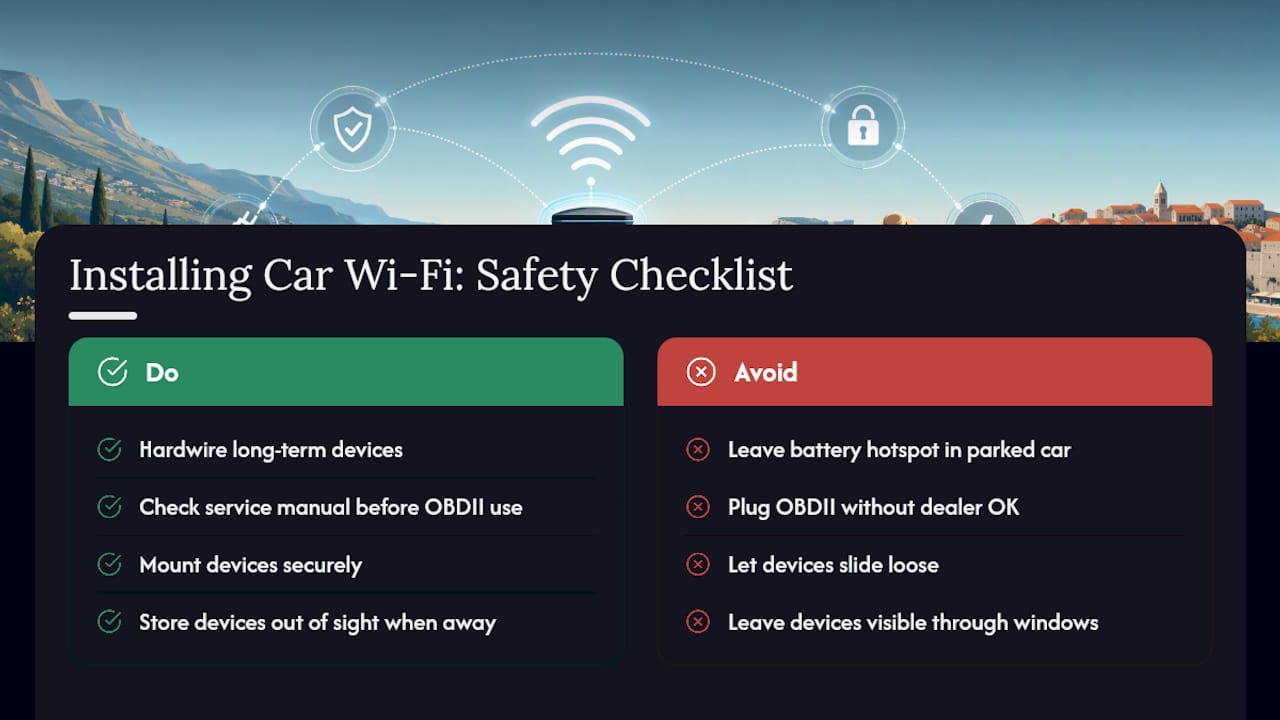
Never leave a battery-powered pocket hotspot sitting in a parked car through a Croatian summer afternoon. Interior temperatures in a closed vehicle can climb well past what lithium batteries tolerate, and battery swelling or failure becomes a real risk after repeated heat exposure. If the device is staying in the car long-term, a hardwired or battery-free setup avoids that risk entirely.
OBDII plug-in hotspots deserve extra caution in newer vehicles. Some manufacturers route telematics and driver-assistance systems through the same diagnostic port these devices use, and plugging in a third-party gadget can create conflicts or even trigger warranty questions. Check your service manual or ask a dealer before connecting anything to that port, especially on a leased or newer luxury model.
Pro Tip: For fleet vehicles or any car used daily, a hardwired installation similar to what’s covered in Moto Watchdog’s guide on hardwired GPS trackers applies to Wi-Fi routers too: permanent power eliminates the battery-swap hassle and the heat-related failure risk altogether.
Mount any device securely rather than letting it slide around on the dashboard or seat. A loose router is both a distraction risk and an easy theft target if visible through a window while the car is parked. Keeping devices out of sight when you step away takes ten seconds and prevents a much longer headache.
Checklist: What to Test Before You Buy or Activate Car Wi-Fi
Walking into a shop or setting up a rental car’s connectivity without a plan usually ends in a device that underperforms once you actually hit the road.
Before handing over money or activating a plan, ask the vendor these questions:
- Does the device support an external antenna, and does it come with one?
- Which LTE or 5G bands does it support, and do they match Croatian operator networks?
- How many devices can connect simultaneously, given that most units handle 5 to 10 at once?
- What power options exist (USB, 12V, internal battery), and what’s the warranty term?
Once you have the device, run these tests before relying on it for a real trip:
- Check signal strength on your typical daily route, not just at home.
- Connect every device you’ll actually use at once and confirm none drop out.
- Run a proper speed test and compare it against what the plan promised.
Roughly 5 to 10 devices is the practical ceiling for most consumer routers and integrated systems, so count your actual passengers and gadgets before assuming a budget device will keep up with a full car on a long drive.
Keep your SIM terms, warranty card, and any compatibility notes in one place, ideally a photo on your phone, so you’re not digging through drawers if something stops working mid-trip.
Onboard Wi-Fi on Croatia’s Private Transfers and Tours
Onboard connectivity has become a quiet expectation for a specific kind of traveler: the business passenger checking email between an airport pickup and a meeting, the family keeping kids entertained through a long transfer to Plitvice Lakes, or the remote worker who needs a stable connection between coastal stops.
For providers running premium vehicles, the operational details matter as much as the technology. That means keeping devices charged and ready before every pickup, providing a guest network name and password passengers can use without asking twice, and keeping an eye on data consumption when several passengers stream simultaneously during a multi-hour coastal drive. Done well, it’s one more detail that separates a comfortable, well-planned transfer from one where passengers spend the ride fiddling with their own phone settings.
Why the Hardware-First Advice Misses the Point
Most guides on this topic treat Wi-Fi u vozilu as a pure hardware decision: buy the right router, pick the right SIM, done. That advice works fine if you’re a daily commuter or a family doing a two-week self-drive itinerary. It falls apart for a very common type of Croatian traveler: someone flying into Split or Dubrovnik for a week, moving between a handful of cities and UNESCO sites, who has zero interest in researching LTE bands or worrying about a battery swelling in a hot parking lot.
The real question isn’t “which router is best.” It’s “how many days of your trip will you spend managing a gadget instead of looking out the window at the Adriatic.” For a short visit, that math rarely favors buying hardware at all. The most overlooked option in most guides is simply not owning the problem: booking transport where connectivity is already handled. Travelers optimizing for convenience over control should weigh that trade honestly before adding one more device to their carry-on.
— Croatia
Prefer Connectivity Handled for You? Book a Private Transfer Instead
Croatia-private-transfers offers an option for travelers who prefer not to manage their own router and want a relaxed arrival. They provide modern, air-conditioned vehicles and can arrange onboard Wi-Fi on request, helping avoid SIM shopping and battery-heat concerns.
Simply mention your connectivity needs when you book your private transfer or intercity route, and our English-speaking drivers handle the rest, whether that’s an airport pickup, a coastal tour, or a multi-day itinerary between UNESCO sites. This works especially well for business travelers who need a reliable connection between meetings, or families who’d rather keep kids entertained than pass around a portable router in the back seat. If you’re weighing whether to invest in your own hardware or let someone else manage it, browse our transfer options and request onboard Wi-Fi as part of your next booking.
Sources
- Koje mogućnosti postoje za postavljanje Wi‑Fija u automobilu? | PC CHIP
- Wi‑Fi hotspot | VW Connect | Volkswagen Hrvatska
- Wi‑Fi in vehicles | Ericsson / Cradlepoint
- Wi‑Fi Hotspot – InControl
FAQ
What’s the Best Wi-Fi u Vozilu Option for a Family Road Trip?
A portable MiFi router is usually the best fit for families, since it supports multiple devices without draining a phone battery and can run on external power for the whole trip.
How Many Devices Can Connect to Car Wi-Fi at Once?
Most smartphone hotspots and portable routers support 5 to 10 devices simultaneously, with some integrated factory systems supporting similar counts.
Does Integrated Car Wi-Fi Need Its Own Data Plan?
Yes. Integrated systems like Volkswagen’s We Connect typically run on a data package purchased through the automaker’s connectivity partner, separate from your personal phone plan.
Is It Safe to Leave a Portable Wi-Fi Router in a Hot Car?
No, battery-powered routers left in hot cars risk battery swelling or failure, so hardwired or battery-free options are safer for long-term use.
Can I Just Book a Transfer Instead of Buying Wi-Fi Hardware?
Yes, travelers who prefer not to manage their own device can request onboard Wi-Fi when booking a private transfer, which avoids SIM shopping and hardware setup entirely.